This note is updated at my new blog space only, blog note http://www.teigfam.net/oyvind/home/technology/050-sound-on-sound-and-picture/. Welcome there!
Goal
This post is for you who want to move all your music, video, AppStore programs etc. - or rather, your iTunes library - to a network disk.
Inconcistent iTunes versions will probably kill this architecture! (Sept. 2010)
I now have left this architecture (Oct. 2010, see (*) below)
I now have left this architecture (Oct. 2010, see (*) below)
With iTunes 10 running on one machine and iTunes 9 on the two other machines (iTunes 9.2.1 is still "newest version" for the G4 PPC Tiger machines), the iTunes library files on the network disk is bound to be in conflict between generations of iTunes (soner or later, I'll update when 10.0.x). I will certainly choose the newest, and I will then instead run the two older iTunes' sharing the music from the one newest. Apple use their Digital Audio Access Protocol (DAAP) for sharing, it won't be incompatible across versions. I would then for my usage let the Mini (see post 019) run all the time.
I would certainly have to learn if I would have to sync the iPhones, buy music etc. on the newest iTunes - if I only want the newest to "share out" its library. The usage would probably have to change. But the good thing is I would then be inside Apple's intended usage!
(Sept.'10)
(*) - One iTunes shares out to the others
When Apple parked the iTunes version on Tiger to 9.x.y with respect to the flow of newer versions, in Sept. 2010, I was forced to leave the architecture described in this note.
In retrospect I don't understand why I bothered doing it the hard way, when Apple in fact have a better solution. There are limitations to Apple's architecture as well. Like start-up time and the lack of CD covers on the slaves.
I think that I had been sceptical to two things: having the Mac Mini run all the time and the network disk (I did not drop it!) having to spin all the time:
- However, after I started Jack OS X Server (See "019 - Play (with) network-disk based iTunes library?") to run continuously on it, I saw that it was no problem to run the Mac Mini all the time: there is no fan that I can hear at least.
- Also, running iTunes all the time would still let the network disk enter idle and stop when I didn't play music (and at the sime time there was no other activity)
- Now, have a look at Post 019 - it's getting better, now also using Apple's remote App! All of a sudden it's easier than old CD's.
A plus with the Apple's way to do this is also that I may now have copies of some of the music on the slave machines.
When going to the Master / Slave architecture (and not pseudo multiuser client), I had to move the iPhone synch directories to the newest machine and newest iTunes. This was some job, but I "only" needed to understand what files are where and move accordingly. I am not certain if iTunes has a function like "Move iPhone synch to another machine". This might be very nice to have! (Reported to http://www.apple.com/feedback/itunesapp.html)A disclaimer and four warnings
Disclaimer: I take no responsibility for any errors in this post. Your iTunes library is valuable, so you should read this text with caution. A good idea is to backup your iTunes library before you make any move.
The first warning is that if you move your iTunes library from, say, your laptop - then you have moved it! In other words: if you bring your laptop on a vacation - your music stays home! However, if you have synchronized your music with your iPod or iPhone - you still have the music with you. (You may keep a copy of the iTunes library on your machine - if you want to make things worse for yourself as the months pass.)
The second warning starts with one good news. On the vacation you may upload iPhone pictures to your laptop (substitutes for not having your proper digital camera available). Uploading is a mechanism outside iTunes (Image Capture on a Mac). However, if you want to do more with iTunes and your iPod/iPhone on that vacation - go ahead. Just follow iTunes' instructions when it cannot find your iTunes library. But - what do you do with the two libraries you have when you come home? The one on the network disk and the one you, on that vacation, have brought up from nothing on your laptop? Do as suggested here? I have not tried it, but I am not certain if I want to.
The third warning was about Front Row. See below.
The fourth warning. Read Switching between iTunes machines (below) for a major drawback!
The fourth warning. Read Switching between iTunes machines (below) for a major drawback!
You should now be warned, and may read on. I have moved our library, and have not regret it.
The machine park
Our machines are three, all Apple machines, two with Power PC G4 processor running Mac OS X version Tiger and one with Intel processor running Mac OS X version Snow Leopard. All run iTunes 9, latest build. This post is in that context. There is a figure my note 019.
The problem description below is from iTunes 8 (2008-2009), but I have no reason to believe that newer versions, like 9.0.2 that I installed recently has helped. There also is a new effect with 9.1 (April 2010, see below). iTunes 10 will also soon be tested. Apple notably have fixed some "sharing" problems, but this post is not about cross-iTunes "horizontal" sharing, but about to-network-disk "hub" sharing.
Moving iTunes files: The Reference
I moved the files according to this recipe: www.ilounge.com/... (Transferring your iTunes Library) written by Jesse David Hollington. You should read that document first (but see next paragraph even before that), and perhaps move files from one machine only. Then you could come back and read the issues I discovered when I moved iTunes libraries from three separate machines.
If you just need the how, and not the why, go to Apple's excellent pages "iTunes for Mac: Moving your iTunes Music folder" or "iTunes for Windows: Moving your iTunes Music folder".
Another ok reference is this wikipedia article about library sharing.
The first move
The first move of files I did following the above chapter. It goes something like this: 1.) First set the iTunes Music folder location and 2.) do Consolidate library and let iTunes work for a while, then 3.) stop iTunes and then 4.) move the iTunes database files (not the iTunes Music folder, it has been moved for you in point two) to the network disk, then 5.) press the OPT key and start iTunes (keep it depressed until you see iTunes) and 6.) tell iTunes where the new iTunes library now is, namely on the network disk.
After that music plays perfectly - from the network disk - on all machines, but one at a time (see below)!
The second and third moves
On these machines I saw that I did not have to move the iTunes database files, as iTunes did that for me, and it merged the new contents into the network disk's database files. This had to be like this, since for each database type of file, the now central iTunes library would only have one of each. For the first machine I had done this manually.
Multi-user access: one iTunes at a time
As Hollington points out, iTunes will not treat multi-user access according to the book. It simply is not built that way by Apple. Not yet. I think this means that even playing some song on two machines at the same time may fail, since iTunes writes to some database file how many times a song has been played. It may be a good idea to backup the database files from time to time. Multi-user access would allow only one user to open the files for writing.
Tiger vs. Leopard on multi-access
What I discovered was that while Tiger machines would happily open as faulty multi-user, Leopard halted me and said it could not open the database because it did not have the correct access rights. True! I then quit the Tiger iTunes and then started the Leopard iTunes - normally. I wonder why Apply did not do this for Tiger.
However - even if I, in Tiger, am allowed to start iTunes and play songs when another iTunes also plays, iTunes still seems to protect the database files from faulty writing. When Tiger iTunes tries to write to one of them (to increment the play count?), then Tiger iTunes will tell that it failed to write to the file. This is really good news. So, is it less error prone than I thought?
Reappearing iTunes files
On one of the Tiger machines I saw the iTunes database files reappear on one machine. However, it played from the network disk. I then did just like I had done after I had moved the files: i just renamed the iTunes directory to iTunes_somename to make iTunes not find it. Then, when I knew things worked, I deleted the local directories.
AppStore applications and their data lost
On one of my synchronizations after this, where the iPhone (2.2.1) was synched with Tiger iTunes (8.0.2) - some of my iPhone applications got lost! One of them was Tuner Internet Radio from Nullriver Inc. I had observed that iTunes had shown me a list of apps to synchronize, but had really not paid attention to it. So, iTunes did what I told it - synchronized - and then removed some that were not in the list! No warning that that list was smaller than the (card layout) list in the Programs (Programmer in Norwegian). And I had not noticed.
In my despair I double-clicked the icons in the Programs window, and then iTunes told me it could not find the original app executable file. I handled each of the programs, only some of them were lost. Then I pointed iTunes to the external network disk, where the apps had stayed since my change to using a network disk, one app after the other. Having finished all that, I went to the synch window again, to learn that iTunes now wanted to synchronize the full number of apps. Good, so I synched.
Only to learn that my list of Norwegian radio stations was gone!
iTunes tip: for those with a shared network drive - count the number of apps you have, and don't let iTunes synchronize any one of them away!
I have no idea why iTunes had lost track of some of my AppStore apps' original files. Apple, do you hear me?
Backup of the network disk
This is quite important. Read on in my post 004 - Living with a network disk in the house.
- Latest update (29July2010): iTunes 9.2.1 and FrontRow 1.1 (all the time here the context is iTunes everything on the network disk) - FrontRow at first refused several times, showed the CD covers, but could not play the music. After a while it did play the music. But all of a sudden I got a crash message from iTunes, which I had stopped in order to get FrontRow up. Network iTunes is still not arrived completely
- Older update (8May2010): FrontRow 1.1 and iTunes 9.1.1 running in Mac OS 10.6.3 Snow Leopard now works perfectly! I don't know exactly when the change happened, or which componennt that did the trick, but it works! Airport Extreme is still 7.4.1 (not the newer 7.4.2). (Even this reported to http://www.apple.com/feedback/itunesapp.html)
- Even older update: this was fixed in Front Row version 2.1.7 (11Mar09) - but it was in fault again half a year later running Leopard. It also does not work on Snow Leopard 10.6.2, Front Row 9.0.2 - where iTunes 9.0.2 certainly works perfectly well. I still have Airport Extreme 7.4.1, as 7.4.2 had to be removed due to intermittent failures. (Reported to http://www.apple.com/feedback/itunesapp.html)
- Older update (8May2010): FrontRow 1.1 and iTunes 9.1.1 running in Mac OS 10.6.3 Snow Leopard now works perfectly! I don't know exactly when the change happened, or which componennt that did the trick, but it works! Airport Extreme is still 7.4.1 (not the newer 7.4.2). (Even this reported to http://www.apple.com/feedback/itunesapp.html)
- Even older update: this was fixed in Front Row version 2.1.7 (11Mar09) - but it was in fault again half a year later running Leopard. It also does not work on Snow Leopard 10.6.2, Front Row 9.0.2 - where iTunes 9.0.2 certainly works perfectly well. I still have Airport Extreme 7.4.1, as 7.4.2 had to be removed due to intermittent failures. (Reported to http://www.apple.com/feedback/itunesapp.html)
A month into the move I discovered that Front Row does not play my music any more! This is status with all latest updates Feb. 2009. A month indicates that I don't use Front Row very much, but I certainly was planning to.
Where Front Row could share any iTunes library from any other machine seamlessly, it now just tells me that it can't find any music, and that I should import or buy music.
According to http://en.wikipedia.org/wiki/Frontrow, Front Row does not support the necessary protocols for network media. So, it must be a matter of time. (So, with the update above, it's been fixed!)
Version conflicts
When I updated to iTunes 8.1 (March '09) on two machines, I had to update on the third. The old iTunes politely told me that the library was from a newer version, gave me no option - and quit. This is as it has to be - making file formats forward compatible is impossible if Apple, in this case, has decided that the user (I , in this case) must have the new functions. Even on lessser criteria it's hard to make file formats forward compatible.
September 2010: iTunes Library conflict between versions 10 and 9? (See "Inconcistent iTunes versions will probably kill this architecture!" (above) and note 019 for a figure and further updates about this) (Also See Apple's iTunes download page which includes G4 hardware but excludes Tiger 10.4 sw, my question and Phil's)
September 2010: iTunes Library conflict between versions 10 and 9? (See "Inconcistent iTunes versions will probably kill this architecture!" (above) and note 019 for a figure and further updates about this) (Also See Apple's iTunes download page which includes G4 hardware but excludes Tiger 10.4 sw, my question and Phil's)
iTunes tip: when you download the new version, place the installable file (.dmg for Mac OS) on the network disk - and use it when installing on all machines. No need to download it many times!
What is an "iTunes server", some times installed on third party network stations?
I queried this to a discussion group at ReadyNAS (www.readynas.com/forum... - You must get an account to read the thread). I had read about "iTunes server", even an "iTunes client" for Netgear ReadyNAS Duo and HP MediaSmart Server. A person there helped me fill in the gaps. Thanks, stretch! I will try to summarize:
First, it's not for me: With my use of iTunes, iTunes and nothing else (like Java Firefly client), I would loose more than I would gain in running the iTunes server. The units may be well worth a buy, but I think, not for the iTunes server. The only thing I, in my opinion would gain, is the possibility to play the music files from more than one iTunes, simultaneously. But the downside is limited functionality and a lot of manual handling of files. (See above when iTunes also may behave like this)
- An iTunes server is most often a free Firefly Media Server (http://en.wikipedia.org/wiki/Firefly_Media_Server ). It understands the protocol that iTunes instances use to talk with each other: Digital Audio Access Protocol (DAAP) (http://en.wikipedia.org/wiki/Digital_Audio_Access_Protocol)
- A unit that runs Firefly will appear as a shared view of the music library, as seen from inside iTunes. This has been mentioned in Comment 3 (below). It would look like any other shared iTunes library - with limited contens.
- Only music. Provided you have not bought it on iTunes Music Store (iTMS).
- If you use Firefly you must keep at least one real iTunes up and running to use when you purchase from iTMS, import (why do they call this "rip"?) CDs, create playlists, synchronize iPhone, iPod etc. That machine will be your management computer. And Firefly will never hear a word from iTunes about this.
- After having done the above, the contents would appear on your management computer. Remember that with the solution I have outlined above, all contents would appear on the network disk, and appear on any iTunes machines of mine. This is the main rationale for me to conclude that Firefly is not for me.
- Should you later decide to move the contents, you must do this by hand, provided the same as above. However, not the mpg (imported and -converted inside iTunes) movies you took of your grandchildren. Follow some of the procedure outlined in this post.
- Shold I have gone for Firefly, I would have ended up having something here, there and everywhere, including my shared network disk. It may be ok for some. However, I would wait for Apple to put a real iTunes server on my Airport extreme. Apple?
Switching between iTunes machines
iTunes 9.1.1 "gapless playback" update triggered at swap between Tiger 10.4.11 and Snow Leopard 10.6.3. No fix for iTunes 9.2 on 10.4.11 and 10.6.4
iTunes now too often goes to Apple's server to query about all our thousands of songs' non-stop playing information. This takes minutes! (iTunes 9.1.1 (11), April 2010 - on all machines).
First iTunes updates its data base library:

During this time I'll have to wait. Much longer than I appreciate. iTunes does this every time I switch machine, and it won't play any music while I wait. On a Lamp Mac with latest Tiger it now uses 10-15 minutes for this update! On the iBook with latest Tiger, it's about 5 min. And on an Intel Mac Mini witha latest Snow Leopard it's a little less. These figures represent a major obstactle to using iTunes with a network disk music library. It's bad!
Then goes on with this "getting information about non stop playing" (*1):
.

During this much longer period I am able to play, but it still is annoying. This second phase is new to recent versions of iTunes (April 2010).
I think this is done after iTunes updates its data base. But I am sure that it is triggered when I swap between Tiger and Snow Leopard playing. Observe that our iTunes library is on a shared network disk, and only one instance of iTunes will ever run.
Update: If I try to stop iTunes while this is running it tells me "processing album pictures" (*2). This perhaps gives a hint of what's going on.
(*1) The Norwegian text is "Finner informasjon om oppholdsfri avspilling" - "Getting information about non-stop playing". A comment (below, thanks Hallvard!) informs me that this is "Gapless Playback" in English.
(*2) The Norwegian text is "iTunes behandler albumbilder. Er du sikker på at du vil avslutte iTunes nå?"
Filed to http://www.apple.com/feedback/iphone.html
History
iTunes 9.1.1 "gapless playback" update triggered at swap between Tiger 10.4.11 and Snow Leopard 10.6.3. No fix for iTunes 9.2 on 10.4.11 and 10.6.4
iTunes now too often goes to Apple's server to query about all our thousands of songs' non-stop playing information. This takes minutes! (iTunes 9.1.1 (11), April 2010 - on all machines).
First iTunes updates its data base library:
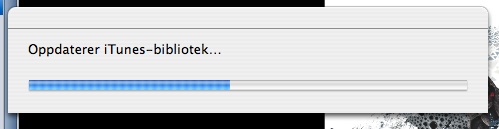
During this time I'll have to wait. Much longer than I appreciate. iTunes does this every time I switch machine, and it won't play any music while I wait. On a Lamp Mac with latest Tiger it now uses 10-15 minutes for this update! On the iBook with latest Tiger, it's about 5 min. And on an Intel Mac Mini witha latest Snow Leopard it's a little less. These figures represent a major obstactle to using iTunes with a network disk music library. It's bad!
Then goes on with this "getting information about non stop playing" (*1):
.

During this much longer period I am able to play, but it still is annoying. This second phase is new to recent versions of iTunes (April 2010).
I think this is done after iTunes updates its data base. But I am sure that it is triggered when I swap between Tiger and Snow Leopard playing. Observe that our iTunes library is on a shared network disk, and only one instance of iTunes will ever run.
Update: If I try to stop iTunes while this is running it tells me "processing album pictures" (*2). This perhaps gives a hint of what's going on.
(*1) The Norwegian text is "Finner informasjon om oppholdsfri avspilling" - "Getting information about non-stop playing". A comment (below, thanks Hallvard!) informs me that this is "Gapless Playback" in English.
(*2) The Norwegian text is "iTunes behandler albumbilder. Er du sikker på at du vil avslutte iTunes nå?"
Filed to http://www.apple.com/feedback/iphone.html
History
I will keep you posted for any interesting things I may experience, or any news that may cross my way. However, the reference above would probably outdate this post fast! So, go there, as I could not and will not mirror it. Updated 25Sept2010.
January 2013: This single blog note will take over sevaral of my earlier blogs: http://www.teigfam.net/oyvind/home/technology/050-sound-on-sound-and-picture/
January 2013: This single blog note will take over sevaral of my earlier blogs: http://www.teigfam.net/oyvind/home/technology/050-sound-on-sound-and-picture/