Tech posts by aclassifier
Also see Øyvind Teig site

You are at http://oyvteig.blogspot.com
Archive by month and about me: here
Last edit: 4Sept2015
Started move: September 2012
All updates at http://www.teigfam.net/oyvind/home/, but the overview is updated

Thursday, February 10, 2011

023 - Concurrency: one writer and one reader is bad enough

Error on page 15 of IEEE Software Jan/Feb 2011

Dear Forest Shull (editor of IEEE Software)

There is an error at that page, in the article “Parallelism on the Desktop” (Guest Editors’ introduction: Victor Pankratius, Wolfram Schulte and Kurt Keutzer [1]). The authors have virtually fallen into the same trap as many programmers working with concurrency or parallelism.

“If the shared resource is mutable, programmers must introduce exclusion mechanisms, such as locks in C++ or synchronized methods in Java, to prevent race conditions (where two or more threads change the resource at the same time and introduce an inconcistent state).”

In order to be correct, the last part may instead read: “where even a single writer and a concurrent single reader may introduce an inconcistent state”.

The principle is called CREW (Concurrent Read Exclusive Write), see http://en.wikipedia.org/wiki/Concurrent_read,_concurrent_write: “Concurrent Read Exclusive Write (CREW) — multiple processors can read a memory cell but only one can write at a time”.

The idea of the concurrency primitives is to avoid this type of situation. In the problem domain, CREW shows how bad it is. In the solution domain, it would be the accesses (read or write) that need protection if there is at most one writer.

I may blog about this error at http://oyvteig.blogspot.com/ any day soon. (Done, with minor edits.)

[1] - Read pdf (4 MB)

(29June11: no response to the contents)
.

Sunday, January 9, 2011

022 - C1X and C++0x concurrency in C and C++ Working Drafts

Updated 15Aug11

Intro

The scope of this post is to learn how the renewed C and C++ standards may help programmers of concurrent systems do their job. I will of course look at this through my CSP-type glasses, with years of occam programming and using CSP/channel-type libraries in ANSI C in embedded systems as my bias. (Post 021- The problems with threads takes me up to this point.)
  • I assume that C1X should end of with C12 for the year's publication data ("formal adoption of a revised standard by the end of 2011, with a publication date of 2012" (C - The C1X Charter)). 
  • And C++0x I assume means that they are late, but from the wiki-page is looks like it's going to end up with C++11. As of 12 August 2011, the C++0x specification has been approved by the ISO. The final working draft before final ISO approval standard is N3291, dated 5 April 2011. This draft is not publicly available; the most recent working draft available is (N3242) dated 28 February 2011. So, it's probably going to be called C++11.
Here are the main references:
Analysis

Letters-in-words and words that I will use to search in the documents. This should(?) indirectly direct me to all the new keywords:
  • "thread"
  • "multi" (task thread -threading)
  • "concurren" (t cy tly)
  • "synchron" (ization, ous, asynchron..)
  • "communicat" (e ion ing)
  • "atomic"
  • " race" (to exclude brace..)
  • "deadlock"
  • "process" (no such term, but there are some threads by name "process")
  • "schedul" (e, ing)
  • "happens before"
  • "inter-thread happens before"
I'd like to see if I could fill in these points:
  1. Process (no: thread) model (versus or and object model)?
  2. Synchronization model?
  3. Communication model?
  4. Memory model - why is there so much about this?
And
  1. Will the C concurrency features be a subset of the C++ concurrency features?
  2. The difference between third-party thread by library (as discussed in post 021) and language defined thread by library as defined here. Is it assumed that the compiler knows what a process (or whatever) is? The answer to this is a function of what I would see from the above list
  3. Per definition it will it be A Good Thing to build a CSP library on top of these! How "nice" will such a library be, i.e. how easy to get correct? (Again, see post 021)
First comments

My post 021 starts with quoting "It is widely acknowledged that concurrent programming is difficult" (Lee). Future programmers of C and C++ may learn by expensive experience that it is even "very difficult".

These papers start after the climax in the middle of Lee's paper. Where he goes on in the right direction, these papers don't go back to square one. They elevate.

Ok, they add concurrency where there was none before. That is their motivation, and it is an important motivation. But whose idea was it to build this on C and C++? Did they ask?

These people are specialists. The papers are not for amateurs, like I would be in their eyes. I have been hidden from most of the problems they solve during my 30 years of concurrent programming. Starting off with a runtime system in 1980 that we bought from a university person who said his code in PL/M had "no errors". We though he was more crazy than he was! Modula 2 and a runtime system for it. Occam on transputers and occam to C (SPoC). Occam will stay the programmer's love of my life. And then back a few hops to C and CSP-type runtime systems.

I really don't understand which planet the open-std.org is on when it comes to concurrency. In post 021 Per Brinch Hansen is quoted for "that Java ignores the last twenty-five years of research in parallel programming languages.". How many years will future C and C++ programmers have lost?

I am not able to see the answer to any of the questions above. There may be answers, but they seem hidden for me. Except: yes - C is a subset of C++ still, at least when it comes to the memory model. I think.

A language isn't for the future just because "futures" are implemented. This is a pattern that I could easily code in occam and install some 20 years ago. But it's nice to have it in a language. And it is nice to have atomicity described. Etc.

But it is the complexity explosion of the standard that worries me. Inspired by Lee, they are two vast seas of nondeterminism - used in another domain - the definition-of-standard domain.

This probably is very reasonable (from C++ page 1152):
29.6.5 Requirements for operations on atomic types [atomics.types.operations.req]
6 #define ATOMIC_VAR_INIT(value) see below
Remarks: The macro expands to a token sequence suitable for constant initialization an atomic variable of static storage duration of a type that is initialization-compatible with value. [ Note: This operation may need to initialize locks. — end note ] Concurrent access to the variable being initialized, even via an atomic operation, constitutes a data race.[ Example: atomic v = ATOMIC_VAR_INIT(5); — end example ]
Please help me. And if I am able to understand, then I need help with some more.

But this is rather ok (C++ page 11):
1.10 Multi-threaded executions and data races [intro.multithread]
1 Every thread in a program can potentially access every object and function in a program (10)
(10) An object with automatic or thread storage duration (3.7) is associated with one specific thread, and can be accessed by a different thread only indirectly through a pointer or reference (3.9.2).
Let's say that I want to implement a CSP library, and when the second process is on a channel, I want to do the rendezvous memcpy from inside the sender process to inside the receiver process. So now I know that I may code this. In C or C++. But observe the level. It's underneath where I should be.

But isn't that what open-std.org has set out to do for me? Make it possible to build any concurrency paradigm on top of what they now give me? Probably they haven't missed that goal. Stroustrup told me exactly this when I approached him at Simula 67's 25th anniversary in Oslo in 1992: C++ does not have any concurrency to let anybody build their own. Now they are building their own.

Last comments

Adam Sampson's thesis Process-Oriented Patterns for Concurrent Software Engineering that he posted in a comment to post 021 certainly points to another direction of research - and present good practices. And I must repeat: the Go programming language faq also referenced in post 021.

Postscript

Is the world really crying for these two houses built on sand?

What did you say, do you need a C/C++ concurrency expert? If you find a good one, you'd need to wait 5-10 years before you know whether he was as good. And he wouldn't know if the house burnt. Working for other companies, making more good money.
.
.


Wednesday, December 29, 2010

Sunday, September 19, 2010

020 - Mac OS X network disk partially seen

This Network disk is connected via USB on an AirPort Extreme (7.4.2 and also the better 7.4.1 (*)). Mac OS X 10.6.4 Snow Leopard (but I have also noticed this on earlier versions). (Not fixed with "Apple Addresses AFP Vulnerability With Security Update 2010-006" in Sept. 2010). Tiger 10.4.11 on iBook G4. Disk connected to AirPort Extreme is via USB, and its a Western Digital WD My Book 1028, formatted as "Mac OS Extended (Journaled)".

(*)
  1. New: follow on 004.6 - Airport Extreme version juggling
  2. I am following this situation after the AirPort Extreme update from 7.4.1 to 7.5.2 in Dec. 2010. I wonder why Apple did such a version quantun leap. 
  3. I am also following the situation after the update of the Snow Leopard version of the AirPort Tool to 5.5.2 in Dec. 2010. This is the client sw that lets me configure the AirPort Extreme. I do not think that an update of it would have any effect on the situation described here, unless by a secondary effect coming from any error imposed by the AirPort Tool doing wrong configuring of the AirPort Extreme and its file server. (On Tiger 10.4.11 the AirPort Tool is 5.4.2, opening for configuration clash on the Airport Extreme. Maybe I should only use the newest version? How does Apple avoid any configuration clash?). Reported to http://www.apple.com/feedback/airportextreme.html
Symptoms

6Jan11 New: the disk may have been in need of repair. See 004.5 - Time Machine backup on Airport Extreme's USB connected disk
  1. The Network disk was visible and "mountable" in Finder. Disk and contents. Fine!
  2. But when I tried "Save as" from any application I could see the network disk, but not the files and directories
  3. However, during the same "Save as" I could make a New directory and save the file in it, even if I could not see the rest
  4. Running Spotlight on the Network disk showed me the hits, but double-clicking failed to open it, but gave an error message about "broken alias"
  5. At the same Spotlight result window, the file path at the bottom was not shown. I guess that since the alias was wrong, it could not build any path either
Fix (permanent?)

I tried to find a fix on the net, but failed. However, I reasoned that there must be at least two ways to look at the disk, and the system seems to pick the wrong some times. So I tried this (Disclaimer, I have Mac OS X in Norwegian, so the English texts could be wrong):
  1. Open Finder
  2. Go, Connect to server
  3. There were two previous servers in the "Last used servers" list
  4. I copy-pasted both server addresses into a .txt-file, for "backup"
  5. I tried first the one and then the other
  6. The one that removed all the symptoms above I noted
  7. Then I "Emptied" the list of last used servers (command in Finder:Go:Connect to server:look at the list)
  8. Finally I copy-pasted back the one that worked
  9. Now the system has one to look for, and since it's the only reasonable and correct - fine!
  10. I think I have found out that using Go, Connect to server and then use the smb (even if that is the only alternative) seems to work (always?)
It was the "afp://...." that caused my problems, and the "smb://...." that was correct. Please tell me why!

Reported to http://www.apple.com/feedback/macosx.html

Postscript

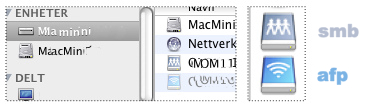
When I tried this again the other day, there were still two alternatives. The smb is the (right, top) icon with the three persons, which always works - and the AirPort-type (right, bottom) icon is the afp, which does not work. It's all cabled, the AirPort is not on. When I tried a "Save as", it knew that the afb didn't work - see, it was "grayed out", compare with the larger non grayed out alternatives. (I have garbled my disk names). Please teach me! At least, I now know which to use and which not to!

I can see that the Mac OS X displays boths icons for the same disk! The one in the window and the one in the title in the window are one of each! I am lost. But point 10 above is my rope now.

(8April11) See further down (search for "smb") to find a point about a synchronization problem.

My iTunes library and Time Machine on this network disk

After I had changed to smb (above), then iTunes it could not find the iTunes library. It's on a network disk. To recitfy I pointed it to to the smb disk with the three-person icon. All fine, also after I stopped iTunes and started it again. Same for Time Machine!

Another observation with iTunes. It also seems to use several mount paths to the network disk. I can start iTunes, and it shows almost everything, but it displays an exclamation mark in front of the music. Then, the first time I want to play it, it opens a shared network disk dialogue box. When I type the password, music plays. I doubt that iTunes has temporary files on the machine's disk, because it complains immediately if it can't find any network disk. 

Tiger - no problem!

Observe that I have no problem whatsoever accessing the same network disk from Mac OS X 10.4.7 Tiger. It seems to always pick afp AppleShare protocol, and the icon is always a globe.

Another problem - a directory's contents invisible on Snow Leopard and not on Tiger

I noticed that synching my pictures on the iPhone from a Mac OS X Tiger machine (iTunes 9.x) all of a sudden showed a picture folder on the iPhone (3G, iOS4.1) that was'n on the network disk that I was synching against. It was called ".... orig" or something along that line. They both showed the exact 100 pictures in each folder, one real and one ghost.

I could see the original network disk directory from the Tiger machine, with contents.

Then I moved synching to the Snow Leopard machine, with iTunes 10. I had to point it to the picture folder of folders on the network disk. After synching the particular folder had gone on the iPhone!

I deleted the iTunes picture data base, and thousands of pictures were rebuilt - but that particular folder was still invisible, both from the Snow Leopard machine and iPhone.

I noticed that both the smb and afb mounts from above showed me the picture folder on the network disk - but it was always empty. I checked access rights all over the place but couldn't find anything. I could not move the directory around, with error (-43) because it could not find the files.

But from Tiger I could move it! (Remember all the other folders were visible on both machines, any mount). But I could not delete anything on Tiger, got error (-50). Tried to restart the disk server on the Airport Extreme. Nothing helped.

Until I made a copy of the folder from Tiger. That copy was fully visible also on Snow Leopard. Then I deleted the original from Tiger, which I now was allowed to! Then I renamed the copy back to the original name. 

Then all was visible, and I synched the iPhone from Snow Leopard - and the folder appeared again! 

HW connected: see top of note.


Related problem - iPhone synching picture fails on 3G, not 3GS

I just synched my wife's and my own iPhone. She has a 3GS (iOS 4.2.1) and I have a 3G (also iOS 4.2.1). We have separate picture folders on a network disk, connected to an AirPort Extreme (with 7.4.1, see blog 004, post 5 and 6).

I had created two directories from the iBook running Tiger, one on her sector and one one mine. I synched from a Mac Mini running Snow Leopard. I used iTunes 10.2. All this was done on 6Mar11 with all sw up to date.

The picture folders were visible on the 3GS. But not on mine, even after an iPhone restart. 

I tried an "old trick" by now: from the Mini I duplicated the directiory on my "sector", deleted the original and renamed it back to the same name. Now it worked! Now also I have the "47 Feb 11" album!

I noticed that iTunes reported that it deleted pictures and then synched some after my "duplicate, delete and rename" exercise! It could look like iTunes saw the pictures on the 3G, but the 3G didn't?

I shouldn't create new directories on a network disk used by iTunes on another machine!


Update: an experiment that went fine

I accessed the network disk that iTunes uses from all three machines: the two with Tiger (iBook G4 and lamp iMac) and one Snow Leopard (Mac Mini). I made a directory with one file from each machine. The files were also originally created on those machines from Grab. Then I duplicated the three album directories into three unit directiories, one for each unit: iPhone 3G, iPhone 3GS and iPad 2 picture synch directories. After synching - all three album directories were visible on all three units. 

This was with iTunes 10.2.1, and it exposed the rather peculiar behavior to have all units' pictures redone (thousands times three). (Update 1: next day it scaled and synchronized all the pictures again! For both iPhones and iPad. Remember, they do have separate picture directories, and nothing has changed from yesterday. Not even the in-logging to the network drive. (6April11)) (Update 2: I think that since I use a network disk, the unneccessary re-synching came because the same disk was mounted both with smb and afp. See further up in this post. When I removed the afb mount, iTunes again only synched what it should and not all.)  (Update 3: Was this fixed with iTunes 10.2.2? "Resolves an issue which may cause syncing photos with iPhone, iPad, or iPod touch to take longer than necessary".)

This blurs the previously original point: that the picture directory had to be created from the Snow Leopard machine to be visible on 3G. I observed this again two days ago when I synched with the exact same versions as today. (5April11)

.

Saturday, August 21, 2010

019 - Play (with) network-disk based iTunes library?

This note is updated at my new blog space only, blog note http://www.teigfam.net/oyvind/home/technology/050-sound-on-sound-and-picture/. Welcome there!

Updated 5Nov2011

This post is a follow-up from my post 018 - From concrete CDs to abstract iTunes files. And now the old amp broke. Things have now become somewhat clearer for me. I now seem to know the questions - and some answers!

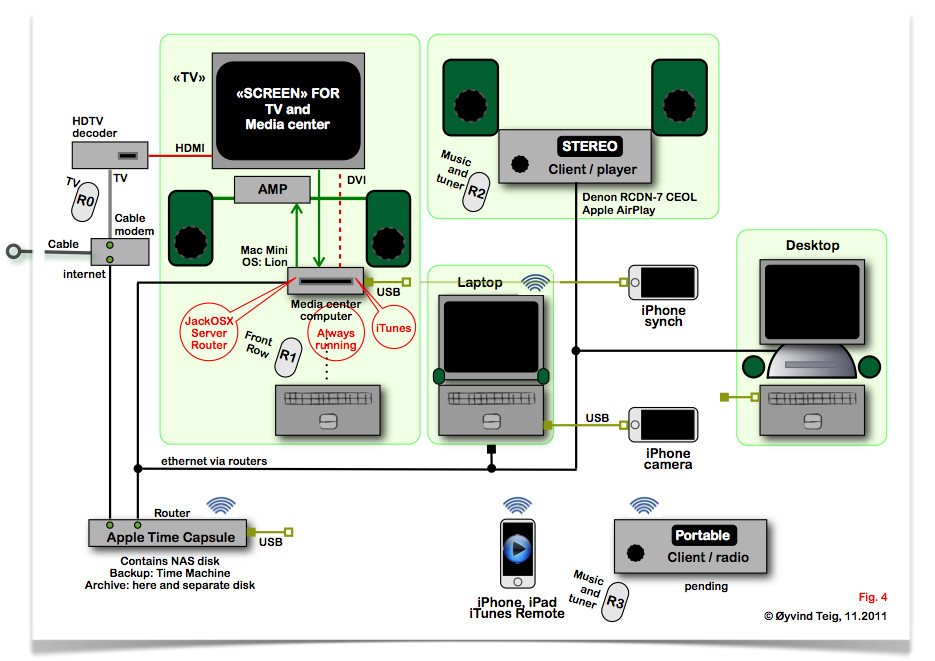
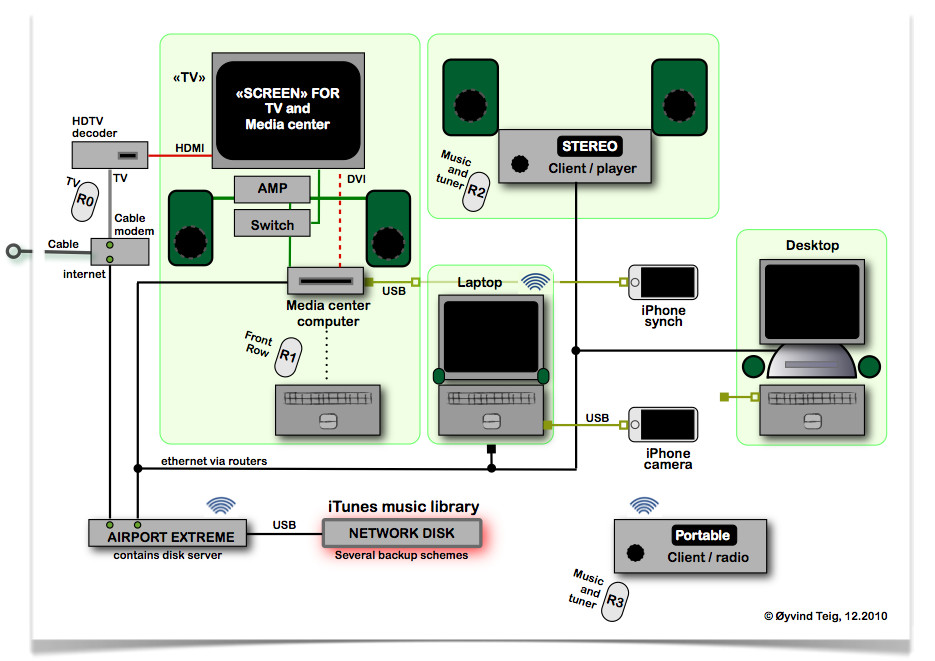
Fig. 1 - Obsoleted physical architecture. See it here ::

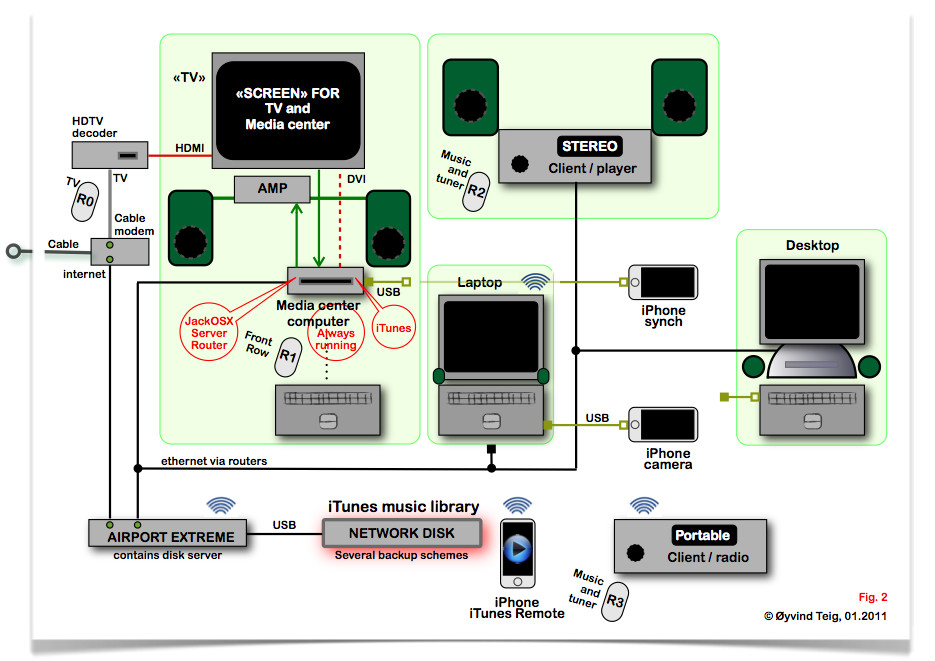
Fig. 2 - Present architecture ::
Before Nov. 2011: http://www.teigfam.net/oyvind/blogspot/019/fig2.jpg

Present architecture

July 2012: I have added Apple TV and thrown out JackOSX because it did not seem stable on Lion. (I am not able to update the old Mini to Mountain Lion.) So, the figure above is not updated, but see a new and simpler figure at note 027 "Experiencing Apple AirPlay" - and some points about Apple TV.

Previous architecure

Now, all iTunes files are located on a network disk and the Media center (Mac Mini) is running the iTunes as Master while the other machines run iTunes as Slaves. I have dropped the pseudo multiclient architecture described in 003 - Shared iTunes library on a network disk when iTunes went on to version 10.x but iTunes on Tiger machines now have stopped at version 9.x (Sept. 2010). There is a small description of the new architecture in the blog 003 ref above (blue text there).

The stereo now is a Denon Ceol RCDN-7 with AirPlay, new June 2011. See blog 027 Experiencing Apple AirPlay.

I also see the Apple's plug-in solution with the Remote app works like a dream! The whole library in the hand, with music graphics and all I sure have learned since I, half a year ago, deemed that solution as not practical!

But I had to (or have to?) quarrel with firmware updates to get there! See 004.5 and 004.6.

In Nov. 2011 I gave up on Airport Extreme with a USB connected NAS disk for an Apple Time Capsule with internal disk instead. See 004 - Living with a network disk in the house.

How I got here

The goal is to be able to play our music (and view the CD covers) on all the units above: the Media center, the Laptop and Desktop, the Stereo and the Portable (sitting permanently on the fridge). The existing local net should be used as much as possible. There should be as little direct cabling as possible, like analogue, USB or FireWire or opto-coupled TOSLINK (S/PDIF).

Also, the Stereo should be controllable from the Media center and Laptop. And the Stereo should be able to stream "sound out" from those two units, meaning that we could have better sound while viewing TV or running iTunes on the Laptop - since they are all in the same room.

A goal is to only require the Airport Extreme and Network disk to be constantly running. So, the Media center should not run to be able to listen to the Portable or Stereo. So, I hope not to have to install some server on the Media center to convert from iTunes file reading to datastreams. (Update: iTunes version conflict (above) and JackOSX (below) have already changed this for me!)

The users would be me and my wife. Children are satisfied with the the wifi when they are visiting. And grandchildren are satisfied with what we are satisfied with, for now. If wishes coincide, then one of us must at best yield to earphones, since the iTunes files are readable from several sources, but the iTunes client is not multiclient. However, radio, internet radio, TV, DVD or a book would be acceptable alternatives, as well as the basement shop - or a good walk. Please observe that a "5.1 home cinema system" or a "wireless multiroom music system" is not what we're after! However, we might end up using a component from one of these.

Units in need of replacement
  • Stereo
  • Portable
  • The audio switch
Then existing units, still in good working condition:
  • Media center computer ("Mini"): Intel Mac Mini with Mac OS X Snow Leopard (10.6.4) (Also controlled from the other machines with a VNC client). This may be replaced later with a newer Mini, one that plays full size AVCHD films
  • Laptop: G4 iBook with Mac OS X Tiger (10.4.11)
  • Desktop: G4 «Lamp» iMac with Mac OS X Tiger (10.4.11)
  • Airport extreme router and disk server: 7.4.1 (7.4.2 is unstable for this usage)
  • The Screen: is a full LCD TV with tuner taken out of use since the shut-down of analogue airborne tv in Norway in 2009. But it has a HDMI and a DVI input which fit exactly to the Decoder and Mini
  • TV sound: is terrible as with most LCD tvs, and a pair of Logitech active PC speakers with subwoofer unit are still small enough and good enough for a tenfold enhancement by all measures. But the Stereo is much better, but too old these days.
  • Other units, as seen in the figure
Other
  • CDs are already obsoleted, as they have all been imported to iTunes. But they are still their own best backup! However, music is dowloaded more and more from iTunes Store
  • DVDs are still kept and played on the Media center
Some existing problems
  • 50 Hz hum. The Mac Mini has a TOSLINK opto-coupled and analogue audio output. Since the audio switch does not have a TOSLINK input, I use the analogue connection. Since the switch is also connected to the Screen, then I get hum, barely audible at normal distance. And the switch is not a switch, it's a Logitech volume control box with 3.5 mm aux input, which does not disconnect the other source (TV) when the input jack is inserted. I need a better solution! (This could have been solved with a Logitech Z-5500 Digital 5.1 Speaker System which has a SPDIF/TOSLINK-input - but it's completely overkill)
  • When I want to play music in iTunes on the Laptop and want some more power, I use a cable from it to the existing Stereo's line input. Surprisingly there is no audible hum. But for a new Stereo I'd need a better solution!
  • There is no way at the moment to play TV sound on the Stereo. Wiring it is no viable alternative.
  • Likewise, there is no way to play the Mini's sound on the Stereo
Questions and answers
  • Yes, I use iTunes for my music handling. I am not afraid, as I believe iTunes and Facebook both lock us in, to count two of themThe Web Is Dead")
  • Streaming of "my?" music with a Spotify client I seldom do. If all I needed resided "in the cloud", some problems would go and some come - and some stay. The architecture I describe already streams a lot, internally and externally - like internet radio stations. So, when iTunes comes with streaming services, so be it! I would still not delete the music library on the network disk, and still wonder if I ever find time to import all the legacy 33 rpm record albums.
  • No, I have no plan to switch to Windows, Windows Media Player or Winamp. I know they're good and that people are satisfied with them. Fine!
I am studying http://jackaudio.org/
  • It supports Mac OS X "Core Audio" (ref), which I learned about in note 018.
  • It references http://www.jackosx.com/ "Jack OS X - a Jack audio connection kit implementation for Mac OS X. Connecting audio from any OS X application to any OS X application"
I also sent a letter to one of the JackOSX authors, who forwarded it to the Yahoo! jackosx group. See http://tech.groups.yahoo.com/group/jackosx/message/3109. I am now (again) registered as aclassifier there. I certainly hope there will be lots of help! I also am aclassifier at Sonos.

I have now dowloaded JackOSX onto the Media center (Mini).
  1. I now don't have to use the "switch" any more. Hum is gone
  2. The TV sound now comes into the Media center (Mini), and is being routed by JAR (Jack Router), to the line (headphone) output to the Amp (unlike Rogue Amoeba's Airfoil there is no notisable delay, so it's actually useful for tv listening)
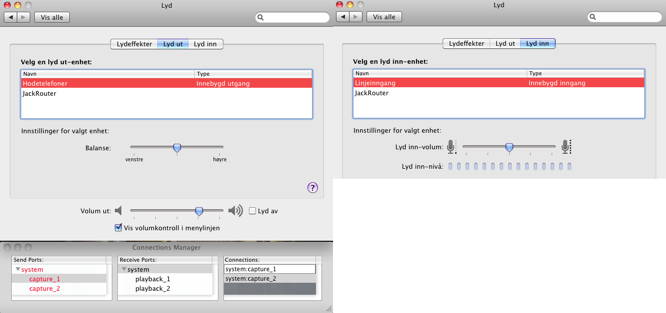
  3. Setting up routing with the JackOSX Connection Manager is nice but has to be learned: push one end and then double-click the other end to connect. And stereo means connection '1' and '2' for "left" and "right"
  4. The Mini has to run all the time, since it's not practical to take the Mini out of idle to switch on the TV. I wish I didn't have to. The Mini is very silent, i.e. I can't hear the fan with the present power
  5. The JackRouter does not have a volume control. But the Mac OS X Sound config dialogue box shows that the Line-in and Headphone-out (used as "Line-out") both have. Line-in volume is set in that window only. Headphone-out volume may be set in that dialogue box, in the top Menu line, or with the Remote control. Perhaps this is called the Master or Main volume control? Then, if I connect Line-in to Headphone-out via JackServer (in the JackOSX Connection Manager) - then the Remote control works both for iTunes, DVD and TV! Of course the TV may also be controlled with the Tuner's Remote control, or the Screen's Remote control or Logitech's main control which is a nice physical knob which always works! (See figure below, where I assume that Norwegian should be little problem, Apple's graphics does most by itself)
  6. TV and iTunes could sound simultaneously. It's not enough to switch. One has to turn something on and something off. However, switching the Screen to the Media center disconnects the TV sound, since it comes through the HDMI to the "TV"
  7. Another thing: it's possible to run this sw invisibly. Stopping the JackPilot stops the Connection manager and the Pilot window but not the JackOSX server. Nice!

This is nice but rather complex. Next problem is to find a way to export a data stream to the Stereo and Portable. The JackOSX network module is not in the download since the authors are still(?) working on it. It's got to be more complex. Hmm

Yazsoft is not it
  • I am looking at the Yazsoft media server http://yazsoft.com (which probably reads CoreAudio from JackOSX server?) and exports UPnP data streams..
  • ..which may be read by a Stereo, being an Arcom Solo unit, see http://www.arcam.co.uk/products,solo,Music-Systems.htm.
  • The Sonos ZonePlayer ZP120 I cannot see is able to read UPnP datastreams?
  • The best of the two worlds would be to find something that sees the network disk iTunes library and UPnP datastreams?
Darwin Streaming Server is not it

The Darwin Streaming Server does not seem to solve my needs See http://dss.macosforge.org/. I found this from reading Comparison of streaming media systems at Wikipedia. Here is from macosforge's documentation:
The streaming server supports QuickTime Movie (MOV), MPEG-4 (MP4), and 3GPP (3GP) "hinted" files. Hinting is a post-process that you apply to your movies to make them RTSP-streamable. You can hint them with QuickTime Pro or the hinting tool available in the MPEG4IP package. If you don't hint your .mov's or mp4's they will still be HTTP-downloadable but it will take them some seconds to start playing. You won't need a streaming server for this, just use good old Apache. (http://dss.macosforge.org/post/40/)
"Good old Apache"

Ok, maybe? Entering a url to a datastream plays that datastream. Starting an Apache server is a matter of ticking in a dialogue box. But then, that's not all I want.

Apple AirPlay ::

Update July 2012: I added an Apple TV unit. See my new note 027 "Experiencing Apple AirPlay".

Apple has already had the AirTunes streaming protocol some time, somewhat discussed in my previous note. I discarded it as pretty uninteresting there.

However, the follow-up protocol AirPlay, introduced by Steve Jobs in Sept. 2010, looks more promising. (Maybe he saw the despair in the notes..).

Apple informs about AirPlay at their page. There's also a wiki-page, of course. Read those now.

Apple say that there will be "featured partners" like "Denon, Marantz, B&W Bower & Wilkins, JBL and iHome" who will produce units that understand the AirPlay protocol. (Most of these companies are "so international" that they present top-level pages pointing to countries, where I found no AirPlay info (7Sept10). But the red should be interesting.)

A company called Frontier Silicon develops solutions for modern radios, like the Pinell Supersound II (blog 18). I would be surprised not to see AirPlay appear from those sources. Not many (any?) present systems will support AirPlay, so I'll have to wait to see it included. It might be worth it. As one of the major vendors answered my question in a closed User group: "Will nn support AirPlay in any of your products?" with the reply "We don't know yet.. with our current line of products it's not possible."

Please see fig.1 and the following (above).

So, why do I think this is for me?

Before I answer, I have a general worry here. See "Rogue Amoeba's Airfoil" (below). It routes AirPlay sound. However, it needs to insert a delay in the sound so that it can be heard in phase on all AirPlay units across the home wired or wireless network. In other words, the tv should also have delayed the video, like Rogue Amoeba's built-in Airfoil Video Player. So, in order to distribute tv, I would have to wait for a tv with builr in AirPlay? So, my general wish to have one audio routing sw only may not be easy to get for a while?
  1. I can play iTunes on any machine and treat my new Stereo (with AirPlay!?) as an external speaker, just like with Airport Express. Nice!
  2. It would work over WiFi and Ethernet. So, the Portable (with AirPlay) could equally be an external speaker!
  3. I would be able to stream also from iPhone to any of these units!
And what would I certainly hope for?
  1. I would hope that I also could take the sound from my tv and pick it up (via JackOSX server?) and route that sound also to the Stereo and Portable. In other words: it would also stream non-iTunes streams. I can't see why this should be a problem, I can already play radio url's in iTunes. (Update 3Jan11: see above, AirPlay probably delays sound like Rogue Amoeba's Airfoil, so this is not really possible?)
  2. I would hope that the Stereo and the Portable, which do not have iTunes (but support AirPlay) would also be able to serve as a client, i.e. I would be able to browse the iTunes library, with artwork and info and all - without running iTunes on any machine. Like how the Sonos ZonePlayer ZP120 would (I have assumed) be able to read my network disk based iTunes library
  3. I would certainly hope that the AirPlay sources would be available under macosforge. That way, any programmer like myself or the JacOSX people could get it going as well! Update: forget it! This most probably needs an AitPlay chip to run.
Posted to http://www.apple.com/feedback/itunesapp.html

Interesting reading is "Forget Apple TV. AirPlay Is Apple's Sneak Attack On Television" at Gizmodo which tells that there's a hw chip needed(?) for AirPlay - and asks if it will coexist with UPnP, DNLA, and Windows 7 streaming. That article points to this BridgeCo blog. Read on!

There also is an interesting post "AirTunes v2 UDP streaming protocol" at http://blog.technologeek.org/airtunes-v2

Rogue Amoeba's Airfoil (for Mac) seems to be AirPlay companion

Conclusion: since I must also run the JackRouter, I don't need Airfoil before we also buy AirPlay hw. And then I would need to run both JackRouter (for tv) and Airfoil (for sound only or video played with the built-in Airfoil Video Player).

It seems like I could "Send any audio from your Mac to AirPort Express units, Apple TVs, iPhones and iPods Touch, and even other Macs and PCs, all in sync!" with Rogue Amoeba's Airfoil for Mac. I will test http://www.rogueamoeba.com/airfoil/mac/. It may even outfunction the JackRouter. (The new version 4 in late 2010 seems more interesting than the version of Aug. 2010 when I first discovered it, partly because my target has moved..)

However, "Airfoil recognizes only AirPlay (formerly AirTunes) devices" (reply to support mail). Therefore Airfoil sw will not see or be seen by Sonos devices, since Sonos doesn't support AirPlay with their present range of hw (as of late 2010).

Rogue Amoeba does not have any white paper to describe Airplay's sw architecture. "As for a white paper, no, sorry" (reply to support mail).

In my architecture TV sound comes in on sound system input. There is no point in taking "live" sound from that input! Simply because Airfoil delays all inputs by some 1-2 seconds. They need to do it like this so that they can play the music at different locations over the wired or wifi local network with all speakers in phase. Even if AirPlay may be designed for real-time response, since they run on top of ip or wireless protocols I don't see how they could ensure unnotisable delay. With regards to the fact that I'd like one sw sound component only, this worries me! Maybe I'll have to run JackRouter for tv sound and Airfoil for iTunes in the future? (This is the reason why they have a separate Airfoil Video Player, so that they can delay the video playback as much as sound playback.)
.
.
.

Saturday, April 24, 2010

018 - From concrete CDs to abstract iTunes files. And now the old amp broke

This note is updated at my new blog space only, blog note http://www.teigfam.net/oyvind/home/technology/050-sound-on-sound-and-picture/. Welcome there!

Latest (Aug.2010): This post is a discussion with myself, and has mostly been closed. Read 019 - Play (with) network-disk based iTunes library? as the next and more mature chapter.

My excuse for keeping this blog somewhat unorganized is that it is being written now, while I try to get organized. I am writing it to help me get organized. And, perhaps you could reckognise your situation?

Intro: how? to play my music

What can help, now that my LP vinyl collection has been stacked away for almost 20 years, and I have reached "9.5 days" of playing with CD import to iTunes, and still have a "day or two" left to import? In other words: I don't have to get more CD shelf space, it's opposite: I need less and less. In practice this also means that the the old Denon CD player DCD-680 will be out of use pretty soon. And it probably won't even be kept as a spare, as has been the old 33 rpm LP player. It was bought when I acquired the CD player, to make it possible to play LPs indefinitely. It still works. However, since CDs can be played (or imported) on any PC or Mac, I am uncertain about the short-term fate of the CD player.

And - for a some time now the old Denon DRA-335R radio and amplifier has been getting rusty in its voice, i.e. broken for any real world listening.

The times they are a'changin, sings Dylan on one of the CDs. Yes, they still are. But how do I cope?

The new backbone: a network disk with iTunes library

My new backbone is not the shelf with plastic, but a network disk with iTunes files, and a good backup scheme. See blogs [1] and [2]. It's available over wifi , but I have also wired all necessary spots. We use the wires most: it's faster, and we swim in less radio waves (set to 10% power).

But I have to move on with the blog. I'll start off with an example, and then perhaps later on try to set up a specification.

Background

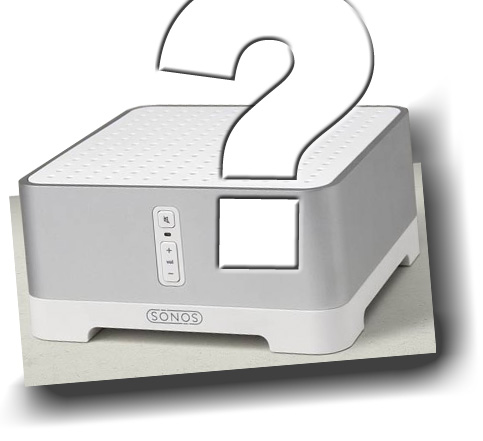
Sonos have a great box called ZonePlayer ZP120 [3]. What's in it for me?

When I say "me" I really mean "us": my wife and me, with no children in the house any more, but they come along visiting, some with grandchildren. How should our new "stereo" be like?

First, we're not talking about a home movie theatre, and no 5.1 surround sound. Not in our living room, and not in any other either. We go to the cinemas, watch tv, and we watch internet tv and DVDs using a Mac Mini and the tv as a screen. The central here is a multimedia rack I made a while ago [4].

However, we are talking about iPhones with playlists. They play home made movies and music in their iPod applications. Quite nice. There is a subtle integration here, with the living room. Even the car. Perhaps also with my workshop in the basement. But how should I do this?

Scenario 1: ZonePlayer ZP120?
This unit could easily replace the old amplifier. It's got a nice Class D amplifier [5] that I'd really like to own, and more than enough power. Power output for stereospeakers and a line subwoofer outputs. It connects to our home's wired network, which is nice - and reads files as well as radio stations out there. It also has wifi, but only over a proprietary SonosNet protocol.

There is a remote control for it, but it costs more than half of the unit. However, a free iPhone App also controls it, and that would help. Especially since we have a first generation iPod touch laying around.

Sonos would read iTunes playlists, once it's told by a Mac/Windows application called "Sonos Desktop Controller" where the iTunes library is located (where the file "iTunes Music Library.xml" is located). Even if it's on the home network disk. So, none of my machines need to run while Sonos streams music from the iTunes-loaded network disk. I like it. So, this software does set-up and it also is remote player client or control system for the ZonePlayer. They even say that it shows CD covers, also while playing iTunes [17]. The sw seems to have changed name since I first started this blog. Now (Aug.'10) it's called "Sonos Controller for Mac or PC".

However, it doesn't play DRM and WMA lossless files. So, some of my songs would not be seen. I have not studied the percentage I loose there.

On the other side Apple has this Airport Express that has the feature that it appears as an iTunes output channel [6]. Apple's protocol (AirTunes, in Sept. 2010 replaced by AirPlay, see note 19) is probably not any more standard than the SonosNet. The iTunes would stream to that unit, and I could connect the 3.5mm jack output to the ZonePlayer's input. The Airport Express also functions as a TOSLINK optical digital connector over the 3.5 mm jack [7]. This is beautiful to avoid hum - but the ZonePlayer only has RCA inputs, so I would need an optical PCM to analogue converter to use it [7]. This is a substantial extra cost. Also, a limitation with the Airport Express is that I can only stream from iTunes wirelessly, not via cable. However, the good thing is that Airport Express would be available from any machine that runs iTunes that sees the network disk.

So, how about connecting the output from the Mac Mini (which also has TOSLINK) to the ZonePlayer? With 10 m of analogue wire, I would rather not. I already have a little hum from not using the TOSLINK output to the little Logitec Z4 that replaces the sound from the Samsung tv. When I switch it to the Mac Mini, that's when the hum comes - since I have not used the supplied TOSLINK. The hum is small, but I may hear it on a bad day. But, as mentioned, I could use 10m of optical and an optical PCM to anlogue converter box [7] here. The cost is about 40% of the price of ZonePlayer ZP120.

I am confused. Buy a ZonePlayer just for the amp? Buy another little amp? Use two user interfaces, one for the ZonePlayer and one for iTunes? Drop iTunes? How big is the Sonos lock-in effect. Now that the iPhones already lock us in, I'd not want more!

(Any system would probably try to lock a user in, ref. Gödel and Russell - and the laws of capitalism. So, trying to be outside one could easily be locked out, which is just another kind of lock-in? Standards or lack of standards also cause lock-in.)

I would suggest you also read David Pogue's article in NYTimes [9].

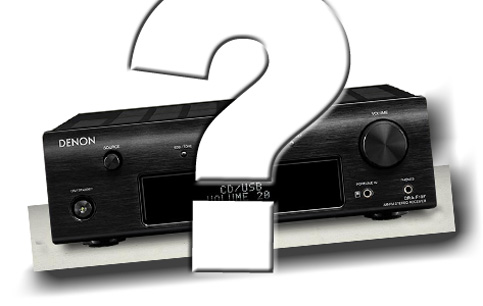
Scenario 2: Just an amplifier: Denon DRA-F107
This unit costs half of the ZP120. But if I add 10m of optical cable and the optical PCM to analogue converter [7] the only gain is a little lower price and the simplicity. As you understand, there is no TOSLINK input here, no digital audio input. DRA-F107 has a phono input from my still kept record player, to play LPs. It also has an FM radio, and DAB+ may be ordered. It also has a remote controller, somewhat easier than the AppStore remote app. ZP120 has internet radio, but no phono input.

This unit is smaller than the two old Denon 43 cm width units, but a little wider than ZP120.

I want to keep the small speakers we have: Bang & Olufsen Beovox CX50 [8]. I bought new elements in them some years ago, and the play quite well. But I would like a subwoofer in addition, since the CX50 are only 2.5 liter internally.

How easy should it be to play a song?

A. Before
  1. Hmm, I'd like to play a record
  2. Where is it, I think I placed it here. Darn, it's too dark, I can't find the CD.
  3. There it is!
  4. Switch on the units
  5. Push in the CD
  6. Find the song and play!
B.1 iTunes with help from external amplifier (before Post 019)
  1. Hmm, I'd like to play a record
  2. Start the Mac and iTunes (I never switch it off, so I only need to wake it up)
  3. Switch TV to become Mac mini screen
  4. Since I played iTunes on another machine before, I must wait until iTunes library has been updated
  5. Select speakers: the local PC/TV speakers or the nicer across the 10m optical cable
  6. Switch that system on
  7. Play
B.2 iTunes when Post 019 is much easier (all already runs, machine and iTunes):

  1. Hmm, I'd like to play a record
  2. Start Apple's "Remote" app your own iPhone (or iPod)
  3. Or use the remote control that came with the Mac Mini to continue playing. Observe I haven't switched on the Mac Mini's tv screen
  4. Play (it may take some seconds before the network disk spins)

C. iTunes files only with ZP120
  1. Hmm, I'd like to play a record
  2. Switch on Sonos ZP120
  3. Find the iPod and start the remote control App
  4. Have it connect to the ZP120
  5. Wait until the network disk is seen by ZP120
  6. Find the song in the list
  7. Play
I don't know which is fastest, but I suspect A. So, why not keep the old CDs? Because I cannot and want not stop the world alone. I see that with a ZP120 I also have the choice between B and C. But with DRA-107 I only have B.

Longevity of living-room music playing instruments

So, how technical should it be? It is good that a two year old grandchild never would be able to start her favourite music alone (B and C, above). And I, being a computer programmer, in a way don't like B and C. They are not usage elegant! Just technically elegant!

But maybe they are, after all, two steps ahead and only one back. And I won't come to half way by going two ahead and one back, but I'll come to another place. In iTunes I will be able to see the full collection at once, with front covers. I can search and group and play across albums with playlists. I can easily move music to iPhones etc.

But is iTunes here in five or ten years? I do keep two networks disks: one connected and in the house, the other in another house, which carry over and mirror some times per year. I also have a copy on a machine in house. How do I know that my backup is a valid backup? Of the CDs there was no backup: lost is lost. Hmm.

And how is ZP120 updated? For how long?

Any system that needs backup and centralized storage needs an "adminstrator". That's me in this house! But will I survive my wife, and if so, admin myself? We're still only 60 young, but age is volatile. Hmm.

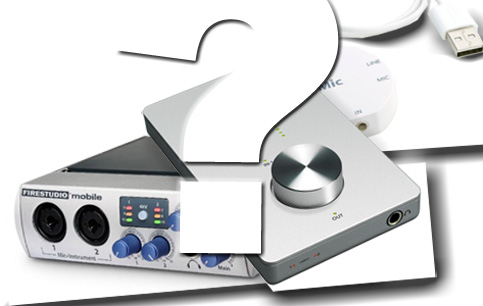
Ok, I need switch: Presonus Firestudio Mobile or Apogee Duet or iMic?
I want to play iTunes directly from the external disk without any machine. And I want the same speakers to play music from any (?) machine playing iTunes, or any sound from any machine! And I want no hum from them. And I don't want to stream the music over WiFi. Seems like I'm starting to understand what I need?

Here are some products that could help. I could place one of these units beside the Sonos player, and any one of them could be of great help. The Presonus (left in the picture) unit takes both FireWire and S/PDIF (TOSLINK) inputs. I don't think it shows up as an external speaker on my Mac, and that I need Presonus sw to be able to stream music out on that FireWire? However, the Apogee Duet will turn up as an external sound unit because it supports Mac OS X Core Audio. 

Thinking about excatly the last point. I have a very old now, iMic USB Audio Interface from Griffin Technology. I have enjoyd it for 8 years, sitting next to a Lamp Mac that I love. It connects to USB and has 3.5 mm stereo input and also output. So it also must support Core Audio, and has since Mac OS X 10.3 I think it was! The iMic is still a product! 

However, none of the products function as an USB, FireWire or optical switch. And I have to have wires from each machine up to the ZP120. Am I getting closer, or am I just learning?

Another thing: FireWire or USB from a remote machine, and analogue out into ZP120 - I have a feeling I would still get some hum! 

I probably either want an optical switch or to stream music from a sound "http driver" directly into ZP120? That would be nice! One url from each machine! I think I will continue my search. Maybe I'm only a driver away! No extra hw!

New knowledge: UPnP - Universal Plug and Play

Maybe the UPnP - Universal Plug and Play [11] (for Mac, for me) comes to the rescue?

A. C. Ryan has a box that seems to read UPnP servers [12]. There is a lot about iTunes and the like at the discussion thread [13], "iTunes streaming". There is pointed to Allegro [14] and Yazsoft [15] Media Servers for Mac.  

And I must find out if Sono ZP120 reads UPnP. 

More new knowledge: DLNA - Digital Living Network Alliance

This is an alliance that defines and looks after protocol usage(?) [16]. There is a connection between UPnP and DLNA that I'll have to find out about. More later, since "knowledge" in the headings is very exaggerated. I'll have to learn this!

Sonos Controller for Mac or PC

This is s client to control the ZonePlayer (see above). It is not a server that helps me stream music from an other machine, which is what I am discussing at this stage.

Jack Audio Connection Kit

Just for the record for myself, this is very interesting, and I will certainly look into this more in my next note. Here is a quote from [18]:
What is JACK?
Have you ever wanted to take the audio output of one piece of software and send it to another? How about taking the output of that same program and send it to two others, then record the result in the first program? Or maybe you're a programmer who writes real-time audio and music applications and who is looking for a cross-platform API that enables not only device sharing but also inter-application audio routing, and is incredibly easy to learn and use? If so, JACK may be what you've been looking for.
JACK is system for handling real-time, low latency audio (and MIDI). It runs on GNU/Linux, Solaris, FreeBSD, OS X and Windows (and can be ported to other POSIX-conformant platforms). It can connect a number of different applications to an audio device, as well as allowing them to share audio between themselves. Its clients can run in their own processes (ie. as normal applications), or can they can run within the JACK server (ie. as a "plugin"). JACK also has support for distributing audio processing across a network, both fast & reliable LANs as well as slower, less reliable WANs.
Logitech Squeezebox™ Touch

Closing this name throwing, here is the last piece I need for homework for my next note: the Logitech Squeezebox™ Touch. It takes physical connections as well as works as a streaming client. See [19]. There's also the Logitech Squeezebox Radio, which I will need to look more into.

An "on the fridge" type radio: Pinell Supersound II

I'll watch out for this in my next note. It's a Norwegian radio, but it looks interesting. See [20]. It also reads UPnP streams. It turns out that Pinell is using a "turnkey solution" from  Frontier Silicon [22] for their units.

Finally

I will try to connect all this in the next note 019 - Play (with) network-disk based iTunes library?

References

[1] - Blog post: 003 - Shared iTunes library on a network disk

[2] - Blog post: 004 - Living with a network disk in the house

[3] - Sonos: http://en.wikipedia.org/wiki/Sonos

[4] - Furniture design an building: Multimedia rack

[5] - Class D amplifier: http://en.wikipedia.org/wiki/Class_d_amplifier

[6] - Apple Airport Express and AirTuneshttp://en.wikipedia.org/wiki/AirPort_Express#AirTunes. In Sept. 2010 replaced or expanded into the AirPlay protocol, see note 19

[7] - TOSLINK optical connection: http://en.wikipedia.org/wiki/TOSLINK
PCM decoding from Mac Mini: S/PDIF: http://en.wikipedia.org/wiki/S/PDIF
PCM adaptor: http://en.wikipedia.org/wiki/PCM_adaptor
Box to convert optical S/PDIF or TOSLINK digital audio to L/R analog audio:
Gefen Digital Audio Decoder DD D/A-converter: http://www.gefen.com/kvm/dproduct.jsp?prod_id=5980

[8] - Bang & Olufsen Beovox CX50 http://www.beoworld.org

[9] - David Pogue (The New York Times), "No ‘System,’ but Music Housewide" - http://www.nytimes.com/2009/11/19/technology/personaltech/19pogue.html?_r=3

[10] - Denon DRA-F107: http://www.hifiklubben.no/produkter/stereo/receivere/denon_dra-f107_receiver_sort.htm

[11] - UPnP - Universal Plug and Play: http://en.wikipedia.org/wiki/UPnP

[12] - A.C. Ryan - PlayOn! Media player: http://www.playonhd.com/en/

[13] - Thread "iTunes streaming" - http://www.acryan.com/forums/viewtopic.php?f=98&t=4029&p=41492

[14] - Allegro Media Server for Mac: http://www.allegrosoft.com/ams.html

[15] - Yazsoft Media Server for Mac: http://yazsoft.com/products/playback/

[16] - DLNA - Digital Living Network Alliance: http://en.wikipedia.org/wiki/Digital_Living_Network_Alliance

[17] - Sonos Controller for Mac or PC - http://www.sonos.com/products/controllers/desktopcontroller/default.aspx?rdr=true&LangType=1033

[18] - Jack Audio Connection Kit - http://jackaudio.org/

[19] - Logitech Squeezebox™ Touch - http://www.logitech.com/en-us/speakers-audio/wireless-music-systems/devices/5745

[20] - Pinell Supersound II - http://www.pinell.no

[21] - Comparison of streaming media systems: http://en.wikipedia.org/wiki/Comparison_of_streaming_media_systems

[22] - Frontier Silicon: http://www.frontier-silicon.com - used by "practically all major consumer electronics brands, including Bang & Olufsen, Bose, Bush, Cyrus, Denon, Goodmans, Grundig, Harman/Kardon, Hitachi, JVC, Magic Box, Ministry of Sound, Onkyo, Panasonic, Philips, Pioneer, Pure, Revo, Roberts, Samsung, Sanyo, Sharp, Sony, TEAC and Yamaha".

.

Tuesday, April 13, 2010

017 - Safari and Opera Mini on iPhone/iPad

This blog will show how a table intensic page (my home page at http://www.teigfam.net/oyvind/) is rendered on the iPhone by Safari and Opera Mini. Naturally, for 10 years the page has been my private browser "acid" test. Since there are billions of other pages to compare with, I'll stick to this.

Observe that iPhone (original, 3G, 3GS, 4) has a 3/2 screen (480/320) or (960/640) while iPad (1,2) has a 4/3 screen (1024/768). My index file uses table layout to percentage of screen, not pixel counts. Except for icons, which have to be pixel-defined. H, T, P and F are also graphics. Opera tries to use some heuristics for the small screens, which are basically not successful. Safari does what it's told and does not attempt to be smart, which is super.

1 - Initial version of Opera Mini
  • Safari on iPhone 3G 3.1.3 (7E18)
  • Opera Mini Web browser, v5.0 
  • 13 April 2010
Verdict: Presently I will use Opera if I need to search for text in a page, need to read it off-line, or have to download a large page with per-MB cost over my phone connection (good speed and also optionally no pictures). This means that I'll mostly stick to Safari, since it's also an iPhone Application, not a port. One "star" for this version.
    1.1 - Safari has always been super

    Safari Safari

    1.2 - Opera Mini on iPhone was bad

    Opera Opera
    2 - iOS 4 with Opera didn't help as Opera was the same
    • Safari on iPhone 3G 4.0.1 (8A306)
    • Opera Mini Web browser, v5.0 (5.0.0119802 2010-05-06)
    • 26 July 2010
    Safari is new, but the layout is 100% equal.
    Also no change in Opera Mini's layout. It's the same version so that's hardly no surprise.

    3 - Opera Mini 6 on iPhone is getting better
    • iPhone 3G, iOS 4.2.1
    • Opera Mini 6.0.0.13548
    • 22 June 2011 (the file has modified contents, of no importance)
    Opera Opera

    4 - Opera Mini 6 on iPhone 4 oops! and getting better
    • iPhone 4, iOS 4.3.3
    • Opera Mini 6.0.0.13548
    • 24 June 2011
    • Showing two standing pictures here. Same iOne
    • Left screen cut reported to http://mini.bugs.opera.com/
    Opera Opera

    5 - Opera Mini 6 on iPad is super
    • iPad2, iOS 4.3.3
    • Opera Mini 6.0.0.13548
    • 23 June 2011
    • The pixel real estate available is about the same as on the iPhone 4, yet layout here is super. Do Opera Software use another algorithm, on board iPad or on their layout server?
    Opera Opera

    Friday, January 22, 2010

    015 - In search of Go! programming language rendezvous

    Intro

    Update: I have (in 2021) bundled this up in my My Go (golang) notes even if this note is not about Go/golang at all.

    I would not have known about the Go! programming language [1] if I had not been made aware of the Go programming language [2]. Since I liked so much of what I read about Go's concurrency solutions, what was more close than to have a look at Go!!

    (Why Go! with an exclamation mark, a punctuation mark in the name? It's a smart language, but the whole idea of including ! in it, is this the reason why even Google didn't detect? See the mismatch above, the paragraph ended with two !!, not at same semantic level!) 

    Name aside. I ordered the "Let's Go!" book [3] to have right here, beside me, since originally, I concluded there's no Go book to hold on to yet (Jan.10). The stuff I write here will be with reference to Let's Go! - but there's a "Go! reference manual" that's included in Go!'s download package. You'll find much of it there.

    I will do no programming here.

    Go! & concurrency

    Go! is an object oriented, functional, procedural and logic programming language. I should study it, I see that I have a lot to learn. However, it is also multithreaded. My home field, even if I only know this little corner.

    A user "spawns off computations as separate threads or tasks". It handles synchronized sharing of resources and coordination of activities. But a process (I prefer that here for thread or task) is not a primary citizen of the language. If you don't use a shared resource correctly, or don't comunicate between processes correctly, well - it's your problem.

    However, there's sync that's built into the language (like synchronized in Java, I guess). It'd better be, it's harder not to, if you need them. Message communication is through a library: go.mbox is the standard message communication library.

    Go! & sync

    There is a sync mechanism. Any stateful object may be protected with sync. A stateful object uses @> where a statefree uses @= as class constructor. A stateful object seems to be a blacker box, since instance variables are only accessable through access methods. However,  there must be more to it than this, i.e. some stateful objects may not be protectable by sync, or some protectable with sync are not stateful (I don't know), since the book points out that deciding whether sync may be used around an object may have to be delayed until run time.

    sync may have timeout.

    sync may be guarded. According to the value a guard or guards, the sync will pick a choice. I don't know if the language requires the guard to be thread safe, local and not exportable from the process where the guard is used. I'm afraid not. The choice is prioritized, it runs the first (in time) first if several are ready. I don't see any non-determinstic choice. Also, I assume that fairness must be explicitly programmed, if it's a matter of concern. And since the guards only must be evaluated to true, then non-determinism may be programmed through random numbers. (But on a formal level non-deterministic and random choice are not the same [4].)

    sync may also be used for notification. So, Java's synchronized and notify is not needed, since it's all in one mechanism here? An object sync'ed on a list may be notified when the list becomes non-empty. Nice! But only one object, so Java's notifyAll is not supported. (But ..All in Java may be too many, so they will have to go to sleep again if it weren't for me..)

    In [3] page 177 McCabe points out that
    The central message about the use of sync is that it makes for an excellenet way of resolving access contention for shared resources. On the other hand, sync is a perfectly terrible technique for coordinating multiple threads of activity. The reason is that there is no direct way of esatblishing a rendezvous of two or more threads with sync. For that we recommend looking at the go.mbox message communication library.
    So, sync makes it possible to make thread-safe libraries.


    Go! & Mailbox / Dropbox

    First, what is a rendezvous? According to the Wikipedia disambiguation page it's "A communication method of Ada (programming language)". Going into the Ada page there's no mentioned of it (yet..). However, it is a place in code where the first one to arrive (be it sender or receiver) waits for the second to arrive. Then they exchange their data. Then both processes continue. The important things here are:
    1. A rendezvous involves no message buffers
      (References to process local data are carried into the rendezvous)
    2. A rendezvous involves blocking
      (But it's never busy-polled, and beware that this does not mean that less gets done! At the end of the day in any paradigm, when something isn't ready it isn't.)
    I have discussed much of this in my blog 007 - and what it might be good for.

    Ada's concurrency is based on C.A.R. Hoare's process algebra CSP (Communicating Sequential Processes). Just like Go's is! (Beware no exclamtion mark). Just like the first runnable language: occam. Just like like the formal language Promela. I say "based on", menaing they are all dialects.

    So, I would need to investigate Go!'s mailbox. The concept is that a mailbox is shared, and that processes drop mail in a mailbox with a dropbox. There is one way to drop: use the post method. It is typed of course, but there is no way to block on it. So, the programmer who thinks that things get easier that way (sometimes it does!), just sends and forgets.

    A Go! mailbox is for multiple writers, single reader (many to one). It handles coordination, but has specificly been designed not to handle synchronization. In CSP, those are the same things, since scheduling is driven by the rendezvous (or, in the speak I am used to: the channels drive the scheduling, or: the scheduler is just a channel handler (if it's not preemptive, which the model is neutral to)).

    Since a Go! mailbox is for multiple writers, single reader, and since there is no addressing or placement, it is the use of them that governs the "addressing". In CSP, one communicates on a named channel (changed from the 1978 to the 1985 version, to better facilitate libraries), which could be not connected or connected or being sent on a channel (occam-pi and Go)). Also, the usage of them is not verified (onlike occam / occam-pi).

    The Go! mailbox reader process may block. Blocking means that you don't have to busy-poll for data. A reader may instruct the mailbox to search in the mailbox for matching messages, and block if there isn't any.

    This is nice! However, I fail to see the rendezvous in it.

    Go! & perhaps some suggestions

    I don't know Go! well, and am not aware of the language's application domain, but provided, as the book mentions, a rendezvous with the properties listed above are of any interest to its users, then I have some suggestion.

    Observe that I don't want Go! to be equal to any other language!

    The suggestion is to add more "symmetry" to Go! The occam realization of has input ALTs with guards, but not output ALTs. Promela has both, with guards. I believe that CSP describes both.

    Go! has protected regions with sync with guards, this should be symmetric enough? But it has blocking on read of a mailbox, not blocking on send.

    1. Blocking on sending: If I drop "any data" in a dropbox, it could block if the receiver does not need "any data". Or, if the receiver waits for a list of names, then block until somebody supplies it. This could make up an interesting type of  many-to-one "channel".

    2. Return to known: occam has a way to directly identify where a reply is to be sent. In Go! it has to be coded. Occam does this by putting a many to one channel into an array of channels, and the receiver ALTs on that array. The index of the array falls out of the ALTing even if it's never sent by the sender, so the receiver knows where to send a reply.

    3. Propagate guards into the mailbox system: I don't see in Go! that we could put an input guard into the mailbox. If a process wants to accept inputs from set A=[a,b,c,e,f], then if set B=[d] tries to dropbox, it would block. One event in A must happen before B (on perhaps a next round) would be triggered. Guards are constant when they are used.

    Would this CSP stuff be interesting to put into an object oriented, functional, procedural and logic programming language with support for concurrency (Go!)? If yes, what would it be good for?

    Disclaimer

    This note has been written with most knowledge about the CSP type concurrency and some of its implementations. My knowledge about Go! is next to none. Therefore, there may be smart combinations of the concurrency related facets and the other primary citizens of the Go! language that could make this note in error. Please comment and I will change!

    Another thing: my suggestions may well fail a verification if modeled in a formal language. Since I have moved things into the mailbox system and included more blocking, it could cause safetly and liveness property violations. In other words, it may not be possible to make a safe language with these features. I hope I am wrong!

    References

    [1] - Go! programming language, see http://en.wikipedia.org/wiki/Go!_(programming_language)

    [2] - Go programming language, see http://en.wikipedia.org/wiki/Go_(programming_language)

    [3] - Let's Go! Francis (Frank) G. McCabe (ISBN 0-9754449-1-3), 2007

    [4] - Non-deterministic and random choice, a little about this at http://en.wikipedia.org/wiki/Promela#Case_Selection


    Archive and about

    Popular Posts

    Øyvind Teig

    My photo
    Trondheim, Norway

    All new blogs and new home page start at
    https://www.teigfam.net/oyvind/home

    Overview of old blog notes here

    My technology blog was at
    https://oyvteig.blogspot.com

    and my handicraft blog was at
    https://oyvteig-2.blogspot.com

    PS: just call me "Oyvind"